Dify 在 v1.13.0 版本中引入了 Human Input 节点,以支持在工作流关键环节进行人工介入与决策,使用场景如表单填写、流程审批等。
人工节点的表单投递渠道,目前支持 Web App 和 Email 两种方式,但对于通过 API 调用的 Dify 流程,如何提交人工节点的表单数据,并触发流程继续执行,目前还没有清晰的文档说明。
本文以一个实际例子,介绍在 Dify v1.13.3 版本中通过调用接口触发包含人工节点的方式。
示例流程
构造一个简单的 人工节点测试.yml 流程,先由 LLM 生成一个计算题,再由人工节点回答计算结果,最终 LLM 判断是否计算正确。
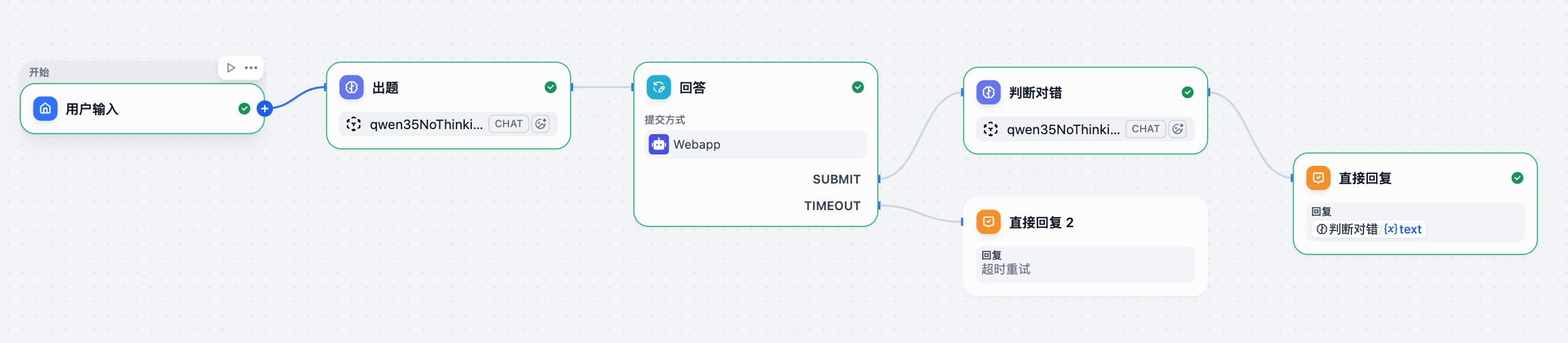
API 调用
按照 https://github.com/langgenius/dify/discussions/33449#discussioncomment-16221158 中内容,API 驱动包含人工节点的流程为:
- Start workflow/chatflow (streaming mode) → get
workflow_run_idandform_tokenfrom SSE events- Submit form →
POST /api/form/human_input/{form_token}(no auth needed)- Poll for results →
GET /v1/workflows/run/{workflow_run_id}untilstatus === "succeeded"
01 发送对话消息
curl --request POST \
  --url http://host:port/v1/chat-messages \
  --header 'authorization: Bearer app-xxx' \
  --header 'content-type: application/json' \
  --data '{
  "inputs": {},
  "query": "hi",
  "response_mode": "streaming",
  "conversation_id": "",
  "user": "test"
}'
注意:这里
response_mode为blocking时会得到400响应。
得到的响应中,可以获得 form_token 和 workflow_run_id 参数,供后面两个接口调用:
{
    "conversation_id": "41f57f05-66bb-4dc7-89bf-4852d0d02bbf",
    "created_at": 1776154089,
    "data": {
        "created_at": 1776154088,
        "elapsed_time": 0.549557,
        "outputs": {},
        "paused_nodes": [
            "1776152782529"
        ],
        "reasons": [
            {
                "TYPE": "human_input_required",
                "actions": [
                    {
                        "button_style": "default",
                        "id": "submit",
                        "title": "交卷"
                    }
                ],
                "display_in_ui": true,
                "form_content": "你好!这是为你准备的一道十以内的计算题:\n\n**5 + 3 = ?**\n\n你可以先在心里算一下,然后再告诉我你的答案!\n\n{}\n",
                "form_id": "019d8b08-96ab-7e1f-ac96-64710927f5eb",
                "form_token": "I73ALdiKLtlQOwDrJfu1YO",
                "inputs": [
                    {
                        "default": {
                            "selector": [],
                            "type": "constant",
                            "value": ""
                        },
                        "output_variable_name": "answer",
                        "type": "paragraph"
                    }
                ],
                "node_id": "1776152782529",
                "node_title": "回答",
                "resolved_default_values": {}
            }
        ],
        "status": "paused",
        "total_steps": 3,
        "total_tokens": 119,
        "workflow_run_id": "bf88e736-46d4-4ab1-ad79-fb04de4a4a70"
    },
    "event": "workflow_paused",
    "message_id": "50c4c7d8-8beb-4438-8d2b-b3fbe8606a9e",
    "task_id": "9afc8422-f7a3-4a45-a985-1e7a0d3ee1bc",
    "workflow_run_id": "bf88e736-46d4-4ab1-ad79-fb04de4a4a70"
}
02 提交表单
curl --request POST \
  --url http://host:port/api/form/human_input/I73ALdiKLtlQOwDrJfu1YO \
  --header 'authorization: Bearer app-xxx' \
  --header 'content-type: application/json' \
  --data '{
  "inputs": {
    "answer": "2"
  },
  "action": "submit"
}'
得到 200 响应码的响应:
{}03 查询流程状态
curl --request GET \
  --url http://host:port/v1/workflows/run/bf88e736-46d4-4ab1-ad79-fb04de4a4a70 \
  --header 'authorization: Bearer app-xxx' \
  --header 'content-type: application/json'
{
"id": "bf88e736-46d4-4ab1-ad79-fb04de4a4a70",
"workflow_id": "953cd66b-e450-46b7-9bd6-868919b467d5",
"status": "succeeded",
"inputs": "{\"sys.files\": [], \"sys.user_id\": \"bruno-test\", \"sys.app_id\": \"fee1dd85-3a58-4adc-9acf-5965148c6657\", \"sys.workflow_id\": \"953cd66b-e450-46b7-9bd6-868919b467d5\", \"sys.workflow_run_id\": \"bf88e736-46d4-4ab1-ad79-fb04de4a4a70\", \"sys.query\": \"hi\", \"sys.dialogue_count\": 1}",
"outputs": {
"answer": "计算结果**不正确**。\n\n**分析过程:**\n题目要求的算式是 $5 + 3$。\n- 5 加上 3 等于 **8**。\n- 你提供的计算结果是 **2**。\n\n**结论:**\n正确答案应该是 **8**,而不是 2。\n(注:结果 2 可能是误算成了 $5 - 3$。)",
"files": []
},
"error": null,
"total_steps": 6,
"total_tokens": 632,
"created_at": 1776329321,
"finished_at": 1776329377,
"elapsed_time": 0.84948
}流程中包含多个人工节点
当流程中包含多个人工节点时,第一个人工节点可按上述方式触发执行,但后续人工节点,按照 https://github.com/langgenius/dify/discussions/33449#discussioncomment-16269242 中给出的方式,在调用 /pause-info 接口时得到的是一个 html,不包含必需的 form_token 信息。可见当前版本下,还不能很好的通过 API 方式驱动包含多个人工节点的流程。
- Poll GET /v1/workflows/run/{workflow_run_id} until status === “paused”
- Call GET /apps/{app_id}/workflow-runs/{run_id}/pause-info to get the new form_token
- Submit the form and repeat
官方在 #32826 中正在筹备新的 Service API 来更好的支持包含人工节点的流程,可以关注合并状态。
参考资料
- Help,How to use Human-in-the-loop nodes in an API?
- How to trigger Human Input Node actions via the Dify Workflow API?
- feat: add service api of HITL